Friday, 26 November 2010

Ideaaa

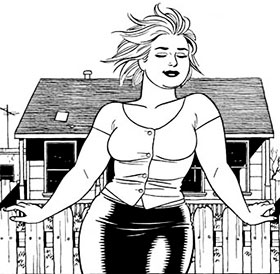
With this blog, I am also creating a sketch book with ideas. One of the design ideas for the website is a tattoo theme. It is easier for me to trace/draw tattoo's on paper, so then I can edit them by hand and then scan them into the computer.


It is then easy to trace around the sketch in either Illustrator or Photoshop. This example was done in Illustrator, but most of the tattoo design work was created on photoshop.


And there we go :)


Friday, 19 November 2010

NOSE ART and Jaime Hernandez

Have you ever seen the world war 2 films, where they hero's flying the aeroplane, with a cartoon pin up girl on the nose of the plane. And he always manages to save the world and get the girl? WELL The cartoon pin up girl on the nose of the plane is called 'nose art'.... here's a couple of pictures,


Which I'm trying to link this with Jaime Hernandez pictures, keeping a strict black and white theme,


And also add a vintage tattoo design...


FUN!!

Check the sketch book for updates and ideas.

Vector this, vector that.

After a conversation with some of the band members, we agreed on a few ideas that they seemed happy with the webpage. They have talked among themselves and decided they really wanted to either have,
  • An Americana theme, keeping with the style the images have been taken here . They would like a vector style theme of their images combined together with a similar effect on each. Also having a 1950's diner and rock 'n' roll theme. 
  • After accidental sending them the blog from last year instead of this one, they really liked the old school tattoo pin up girl/vintage tattoo.The I accentually sent them was this one... http://mattnasher.blogspot.com/
See sketch book for the random tattoo designs. On this blog I'm going to keep all the computer visuals I want to use and stuff that I have edited.


Here's some images that I have used in illustrator.


Vector is....

Saturday, 6 November 2010

How does this look?

I want to keep the design of the website simple, and the colours similar to the styles of the pictures that I have. For experimental purposes I have copied the content box layout of the Mumford and Sons website and went from there.


I used this image of the bad and cut the top and bottom off it and then used it as an experimental header, 


I really liked the idea of having the "content" box broken down into 3-4 boxes, so I applied that to the design of my website.


For the Background, I went on google images and typed in Arizona, to fit in with the style of the header, and came up with the back ground for the page.


And here is the semi finished product, keeping the colours of the boxes on the page similar to the oranges and yellows of the images.

-------------------------

I have also noticed a trend of menu bars on band websites. The most popular ones are, 
  • Home
  • Information
  • Tour Dates
  • Merchandise
  • Facebook/twitter
  • Photographs
I think I will take advantage of this and adapt the ones I think will go with the ban website.


Enjoy :) 

Music and The Design


Seeing as this is a band website, and many popular bands have their songs playing on their website, for example, 


For the front page I want a song playing automatically. I unfortunately don't have Midnight Highs CDs or MP3s at my disposal at the minute, so I have to make do with their tracks already on-line. They have uploaded their songs via Sound Cloud, which has an embedding feature, which allows its users to copy the songs and embed them on what ever website they like to share. 

To add one of their songs to my front page, I have gone on to their Facebook


Clicked on a song which is directed to the left hand side of their Facebook profile.


I then clicked on "Share", which is directly above the play button.


Then that brings this little box up which allows the user to change the colour of the playing box. I think copied the link, and added it to the Footer of my website. I thought it would be better there as it is sort of out the way, so it wont distract the user from looking at the main features of the website. 


Afterwards it looked like this  :)